
Flightview Elite3.8.5 - App Store
You'll be able to see results in few seconds.
Publisher Description




Flightview Elite - Real-Time Flight Tracker, Flight Boards and Airport Delay Status
Flight tracking app from the leaders in real-time flight information. Track upcoming and in-air flights, and receive status alerts via push notification. View Arrivals and Departures Boards for top airports. Check gate assignments, delays and cancellations and use the attractive flight map to see a flight's progress. Forward your itinerary confirmation emails and Flightview will automatically load them into your Trips. See your Trips across mobile devices and at www.Flightview.com. View a North American airport delay map with radar weather overlay. Wherever life takes you, count on Flightview to help you travel smarter!
"Easy-to-use app that should be an essential for air travelers" - Practical Travel Gear
"I highly recommend this App, even if you only fly a few times a year it would be incredibly useful." - AppShouter
Elite Features:
• Flight Boards - Arrivals and Departures boards available for top airports
Flight Tracking Features:
• Track flights on a map showing flight path and current radar weather
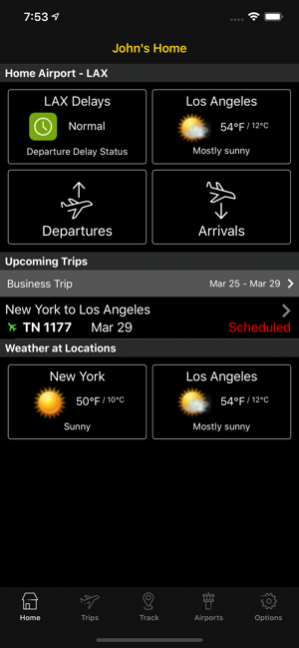
• My Home page gives an easy view into your home airport's current status and your next trip
• Flight Status Push Alerts for flights stored in My Trips
• View terminal, gate and baggage claim information
• See where the plane for your flight is coming from, and check its status via Aircraft's Previous Flight
• Driving Directions to Airport integration with iPhone Maps
• Easily find alternative flights by viewing flight schedules between cities
• Search flights up to 350 days in the future and save them
• See My Next Trip information on the iOS 'Today' view
My Trips Features:
• Forward your itinerary confirmation email to Trips@Flightview.com, and it will be automatically loaded into your My Trips on your device
• Trips are synced between devices and with www.Flightview.com so you can quickly reference their statuses everywhere
• Add notes to flights or trips, such as car rental and hotel reservation numbers, and keep all of your day-of-travel information in one place
• While in-flight, review your saved itineraries in Airplane mode
Airport Delay Information Features:
• View a color-coded map of airport delays in the US & Canada with weather overlay to see how your travel plans could be affected
• View list of airports suffering the Biggest Departure Delays right now
• View Flightview's proprietary Airport Delay Index for 180 major airports in the US and Canada
• View FAA Airport Closures & Delay Programs for major airports in the US
Calendar Integration:
• Post your Flight or the Flights within a Trip to your iPhone Calendar
Sharing Features:
• Share trip itineraries via email or share flights via email or SMS/text
• Post your Trip Itinerary or Flight Information on Facebook
• Login to Flightview using Facebook login
Weather Features:
• View current weather conditions at arrival and departure airports on the Flight Details screen
• 7-Day Weather forecast so you can see the weather forecast for both ends of your trip
Other Great Features:
• Call an airline reservation number directly from the Flight Details screen
• In the Help section, read the Frequently Asked Questions and their answers, Flight Tracking Tips, Flight Status definitions and Flight Tracking terms
Jun 1, 2020 Version 3.8.5
- Fixed an issue that made it impossible for some users to change the theme in the settings menu
- Fixed a number of crashes
About Flightview Elite
The company that develops Flightview Elite is FlightView Inc.. The latest version released by its developer is 3.8.5.
To install Flightview Elite on your iOS device, just click the green Continue To App button above to start the installation process. The app is listed on our website since 2020-06-01 and was downloaded 0 times. We have already checked if the download link is safe, however for your own protection we recommend that you scan the downloaded app with your antivirus. Your antivirus may detect the Flightview Elite as malware if the download link is broken.
How to install Flightview Elite on your iOS device:
- Click on the Continue To App button on our website. This will redirect you to the App Store.
- Once the Flightview Elite is shown in the iTunes listing of your iOS device, you can start its download and installation. Tap on the GET button to the right of the app to start downloading it.
- If you are not logged-in the iOS appstore app, you'll be prompted for your your Apple ID and/or password.
- After Flightview Elite is downloaded, you'll see an INSTALL button to the right. Tap on it to start the actual installation of the iOS app.
- Once installation is finished you can tap on the OPEN button to start it. Its icon will also be added to your device home screen.
Program Details
System requirements
Download information
Pricing
Version History
version 3.8.5
posted on 2020-06-01
Jun 1, 2020 Version 3.8.5
- Fixed an issue that made it impossible for some users to change the theme in the settings menu
- Fixed a number of crashes
version 3.8.3
posted on 2020-05-14
May 14, 2020 Version 3.8.3
Hello flightviewers, here's another small update:
- For users on iOS13, you are now able to set Dark/Light theme via the setting menu. This was previously auto-set based on your phone settings.
- Improved color contrast on certain screens
- Made a number of error messages more actionable when you encounter a problem.
- Other minor bug and text fixes
version 3.7.8
posted on 2020-04-14
Apr 14, 2020 Version 3.7.8
Hello flightview users, just a small update this time around:
- Fixed bug with some Scheduled flights appearing in red
- Fixed bug in the sign-up screen
version 3.7.5
posted on 2020-03-31
Mar 31, 2020 Version 3.7.5
Hello flightview users, we're working hard on making it easier to track, share and manage your flights.
- We've made changes to the app to improve usability and readability
- Simplified the sign up process, we recommend you sign up for an account to keep your trips and flights safe.
- We now support Dark mode on devices with iOS13+ Many of you have been waiting for this, you can change this on your devices Display & Brightness setting.
- We've made it easier to create an account
- Other minor bug fixes and tweaks
version 3.7.1
posted on 2020-02-26
Feb 26, 2020 Version 3.7.1
- Fixed font change.
version 3.5.1
posted on 2010-11-30
version 3.8.3
posted on 1970-01-01
2020年5月14日 Version 3.8.3
Hello flightviewers, here's another small update:
- For users on iOS13, you are now able to set Dark/Light theme via the setting menu. This was previously auto-set based on your phone settings.
- Improved color contrast on certain screens
- Made a number of error messages more actionable when you encounter a problem.
- Other minor bug and text fixes
Disclaimer
Official App Store Link
We do not host Flightview Elite on our servers. We did not scan it for viruses, adware, spyware or other type of malware. This app is hosted by Apple and passed their terms and conditions to be listed there. We recommend caution when installing it.
The App Store link for Flightview Elite is provided to you by apps112.com without any warranties, representations or guarantees of any kind, so access it at your own risk.
If you have questions regarding this particular app contact the publisher directly. For questions about the functionalities of apps112.com contact us.
